07 / 07 · Case study
Swing Tracker
Role
iOS & watchOS Engineer
Discipline
- Engineering
Context
Sports tech
Year
2026
SwingTrackr turns hardware every player already owns into the kind of swing-efficiency tracking that would otherwise mean buying dedicated bat sensors for a whole roster.
Built solo as an iOS + watchOS app, from on-wrist sensor capture through swing detection, physics-based analysis, and a coach-facing history view, using only an Apple Watch and its stock motion sensors.
800 Hz
on-wrist capture rate using Apple's high-frequency sensor mode, with an automatic slower fallback if a watch doesn't support it
$0
additional hardware: every player already had the sensor on their wrist
Tuned thresholds
swing-detection cutoffs calibrated against real swings, so a practice waggle never gets logged as a swing
7 phases
from raw capture to attack-angle coaching, each verified end-to-end before the next began
MLB has bat speed. Rec league has a hunch.
In the majors, the metrics that actually predict performance get tracked in real time. Rec-league softball gets a stopwatch.
Bat speed, exit velocity, and launch angle all come from dedicated hardware with a data team behind it. I coach softball, and I wanted that same kind of signal for my own players: not just who swings hardest, but who's getting more efficient over a season. None of that tooling was within reach on a rec-league budget, and buying dedicated bat sensors for a whole roster was a non-starter.
What I did have was already on everyone's wrist. An Apple Watch carries an accelerometer and gyroscope, the same category of sensors dedicated bat-tracking hardware uses, just never pointed at a softball swing. The question became whether an SE 2, worn during a normal swing, could turn hardware I already owned into a number a coach could actually trust and track week over week.
That meant treating this as a real-time sensor engineering problem first, and a tracking app second: get the capture right, or the rest doesn't matter.
Gated by the workout, not the button
Recording never starts on a tap. It starts once the watch confirms a real workout session is active and running.
That's because Apple's watch hardware only grants sustained access to high-frequency sensor data while a workout is officially in progress, and a swing captured before that's true is worse than no data at all. After starting the session, the app waits and re-checks a few times over the next few seconds to make sure it's actually live before opening the sensor stream.
From there, the app picks the best sensor mode available on the specific watch: a high-frequency mode (about 800 readings per second) when the hardware supports it, falling back automatically to a more universally supported mode (about 100 readings per second) when it doesn't.
Decision
Build capture on Apple's higher-level motion tracking rather than the raw accelerometer and gyroscope, so every reading arrives with gravity already removed and an orientation that doesn't drift over time.
A swing has a shape
The swing-detection logic watches the incoming motion stream like a simple state machine: waiting, then tracking a swing in progress, then waiting for it to settle before confirming it's really over. It only starts paying attention once the motion speed crosses a threshold high enough to rule out a practice waggle or a bat just resting on a shoulder, tracks the highest point while the player is mid-swing, and once the motion drops off, waits a beat to confirm the swing is actually finished before logging it. That threshold isn't a guess: real full-effort softball swings peak in a fairly narrow, well-defined range, so the cutoff was set comfortably below that range to catch every real swing while staying well above ordinary hand movement.
The detail that mattered most in practice: the short cooldown period after each swing (so a single cut doesn't get logged twice) is measured from the moment the swing peaked, not from when the arm motion fully stops. If it were measured from full stop instead, a natural follow-through after a real swing could push the cooldown later and still get mistaken for a second, phantom swing.
Keeping the math honest
Two of the metrics, the reconstructed swing path and the attack angle, both depend on converting raw acceleration into position, which mathematically means integrating the data twice over: once to get speed, again to get distance traveled. That's exactly where small measurement errors compound into meaningless numbers if you're not careful.
The app corrects for this by assuming the wrist is essentially still at the very start and very end of each swing window, since that's true of any real swing, and using that assumption to gradually cancel out the drift that would otherwise build up across the roughly half-second window. Skip that correction step and the reconstructed path is just noise.
Attack angle for a 12-inch ball
The coaching guidance here isn't the generic advice you'd find in baseball content.
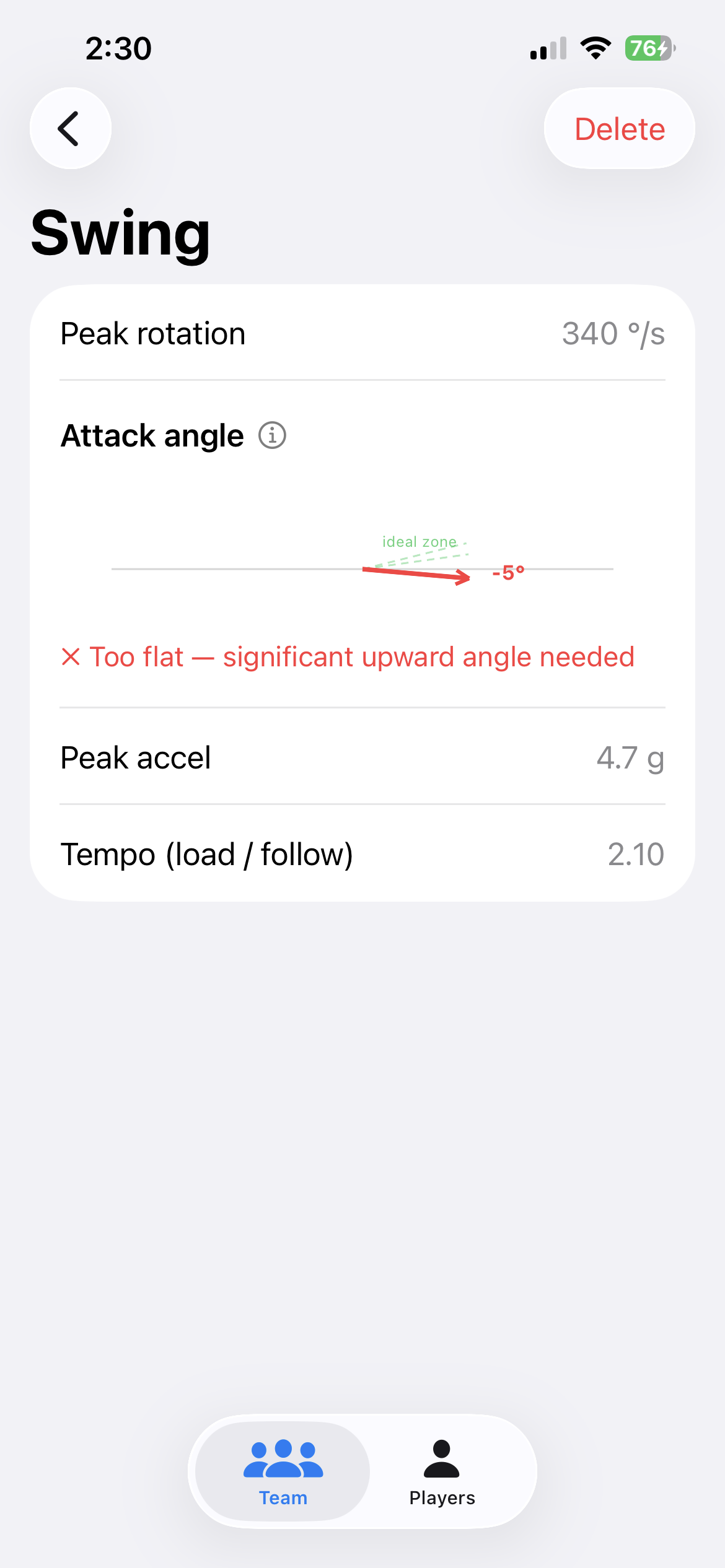
A 12-inch slowpitch softball arrives on a steeper downward path than a baseball and experiences more drag in flight, so the ideal upward tilt of the bat at contact needed to send it the farthest is a different, narrower range than what a baseball hitter would aim for. That range is built into the app as the underlying coaching benchmark, and rather than showing a player a raw angle in degrees and expecting them to know what to do with it, the app translates it into a plain verdict: swing's too flat, right in the zone, or too steep.
An honest distance estimate
The watch's sensor can only measure rotational speed, it has no way to see the forward, translational part of a real swing, so the app is explicit that its estimated hit distance is an ideal-case estimate, not a claim that it's measuring true exit velocity the way a radar gun or ball-tracking camera would. It gets there through a chain of real physics: estimating bat-tip speed from the measured rotation, running that through a standard model of how a bat and ball collide (using official softball specifications for ball bounciness and bat performance), and then applying the standard physics formula for how far a projectile travels at a given speed and angle. It's a defensible estimate built on stated assumptions, and the app says so every time the number is shown, rather than presenting it as more precise than it actually is.
Why the raw number stays the headline
The app can optionally convert its raw speed reading into a calibrated mph figure, but only if a coach takes the extra step of recording a few swings alongside an actual radar-gun reading and lets the app calculate a personal conversion factor from that.
Decision
The raw, uncalibrated number drives the trend chart and the personal-best tracking, not the calibrated mph, even once calibration has been done.
Calibration answers "how fast, in mph"; the question that actually mattered for tracking development was "faster than last week," and answering that only requires a number that's consistent with itself over time, not one that's absolutely correct in an external unit.
A coach-facing app, not just a pipeline
The full build is in, and the coach-facing side is more than a trend line.
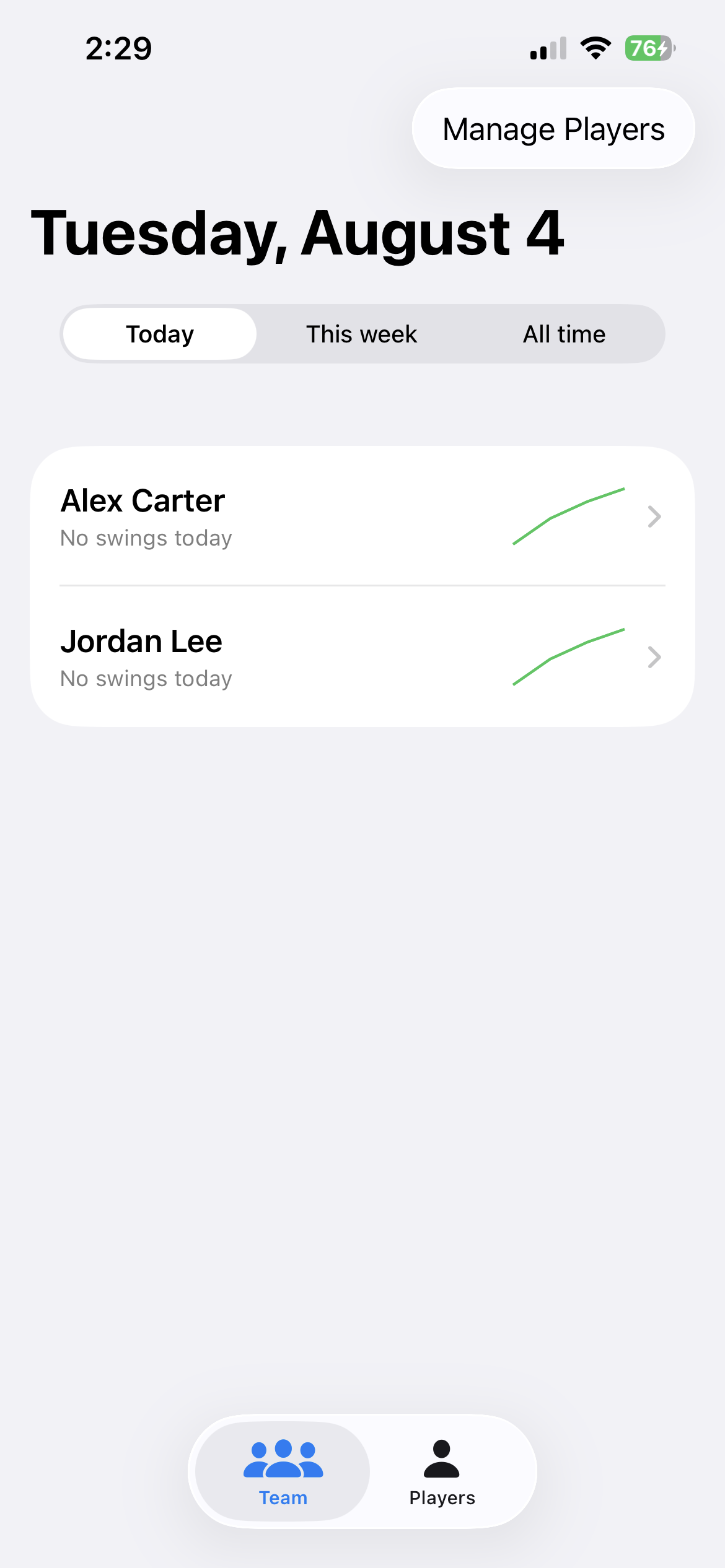
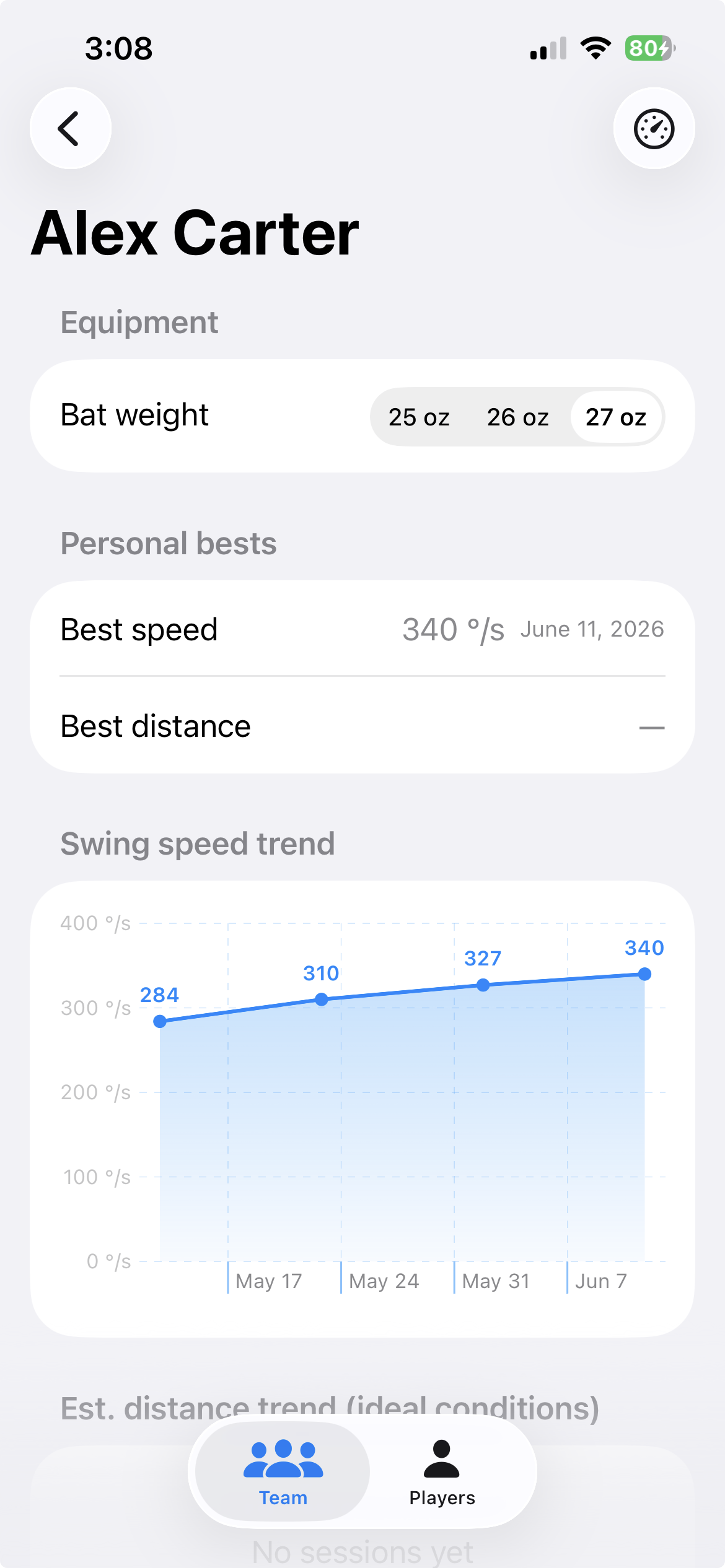
A team dashboard sorts players by their best swing for today, this week, or all time, with a small trend sparkline and a color-coded consistency rating for each player, scaled so it's a fair comparison even between a harder-swinging player and a lighter-swinging one. Tapping into a player surfaces the same swing-speed number as a full trend chart across sessions, alongside their tracked personal bests for speed and estimated distance.
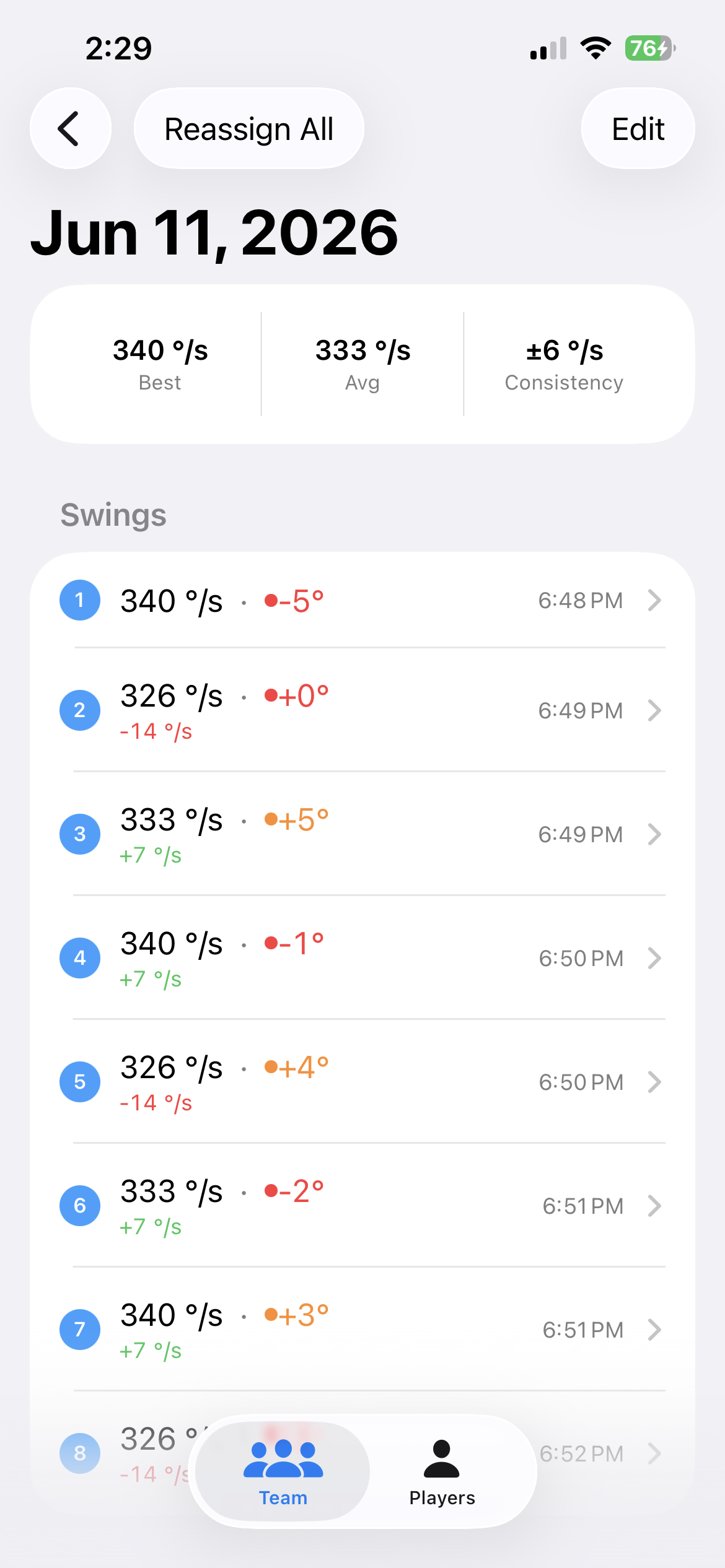
Personal bests trigger a phone notification the moment one is broken, and a coach can reassign a mis-tapped swing, or an entire practice session, to the correct player afterward without losing any of the underlying data.
The single-swing detail screen brings the analysis together for one swing at a time: peak swing speed, a tempo score comparing how long a player loads up versus how long they follow through (a shorter load paired with a longer follow-through reads as a more patient, fuller swing), the attack-angle verdict, and a reconstructed 2D drawing of the wrist's path through the swing with the point of contact marked.
What's still an approximation, on purpose
Two things are flagged rather than hidden.
The attack-angle reading is measured relative to however the watch happens to be sitting on the wrist, not to a calibrated sense of where the bat actually is. That makes it a meaningful number for tracking one player's own trend over time, but it hasn't yet been through a setup step that would make it consistently accurate across different grips and stances, and that's the next real gap to close. The estimated distance, as covered above, is a stated physics estimate, not a claim that the app measures a true batted-ball speed.
Neither is a blocker for what the app is actually for, telling a coach whether a player's swing is getting faster and more consistent over a season. Both are worth naming precisely instead of letting a confident-looking number imply more precision than the sensor can actually deliver.